Remote Viewfinder for GC2.5.6
Publisher Description
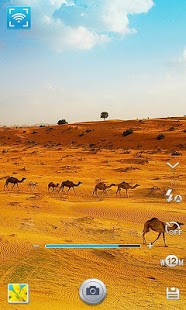
Use your GALAXY Smartphone and GALAXY Tab series as a remote controller for the Samsung GALAXY Camera.
* Description
- Install Remote Viewfinder App to your Smartphone and experience a new way of capturing images. With this app the Samsung GALAXY Camera can be controlled remotely from your Smartphone.
* Function
- Provides real time wireless live viewing of the GALAXY Camera preview screen on your Smartphone
- Provides control of the Shutter release, Zoom, Timer, Flash and Resolution of Samsung GALAXY Camera on your Smartphone
* Operation
- Using this App on your Smartphone allows you to capture and save images on the Samsung GALAXY Camera
- When saving the images, the camera can also store location information provided by your Smartphone's GPS
- Provides remote controlling function for camera settings such as zoom
- Smartphone also receives thumbnails of captured images
* Compatible Devices
- Android version 2.3(Gingerbread) or higher, display WVGA (320x480) or higher
- Supports Samsung GALAXY Camera models from 2012
(May not operate normally in some devices.)
About Remote Viewfinder for GC
The company that develops Remote Viewfinder for GC is Samsung Electronics Co., Ltd.. The latest version released by its developer is 2.5.6. This app was rated by 1 users of our site and has an average rating of 3.0.
To install Remote Viewfinder for GC on your Android device, just click the green Continue To App button above to start the installation process. The app is listed on our website since 2013-12-25 and was downloaded 133 times. We have already checked if the download link is safe, however for your own protection we recommend that you scan the downloaded app with your antivirus. Your antivirus may detect the Remote Viewfinder for GC as malware as malware if the download link to com.samsung.app.srvf is broken.
How to install Remote Viewfinder for GC on your Android device:
- Click on the Continue To App button on our website. This will redirect you to Google Play.
- Once the Remote Viewfinder for GC is shown in the Google Play listing of your Android device, you can start its download and installation. Tap on the Install button located below the search bar and to the right of the app icon.
- A pop-up window with the permissions required by Remote Viewfinder for GC will be shown. Click on Accept to continue the process.
- Remote Viewfinder for GC will be downloaded onto your device, displaying a progress. Once the download completes, the installation will start and you'll get a notification after the installation is finished.
Program Details
System requirements
Download information
Pricing
Version History
version 2.5.6
posted on 2013-12-25
KT 통신사인 경우 Olleh WiFi 접속 App에서 "자동 WiFi연결 상태 관리"의 체크가 해지되어야 연결됩니다.
version 2.5.2
posted on 2013-06-27
Several fixes and updates
